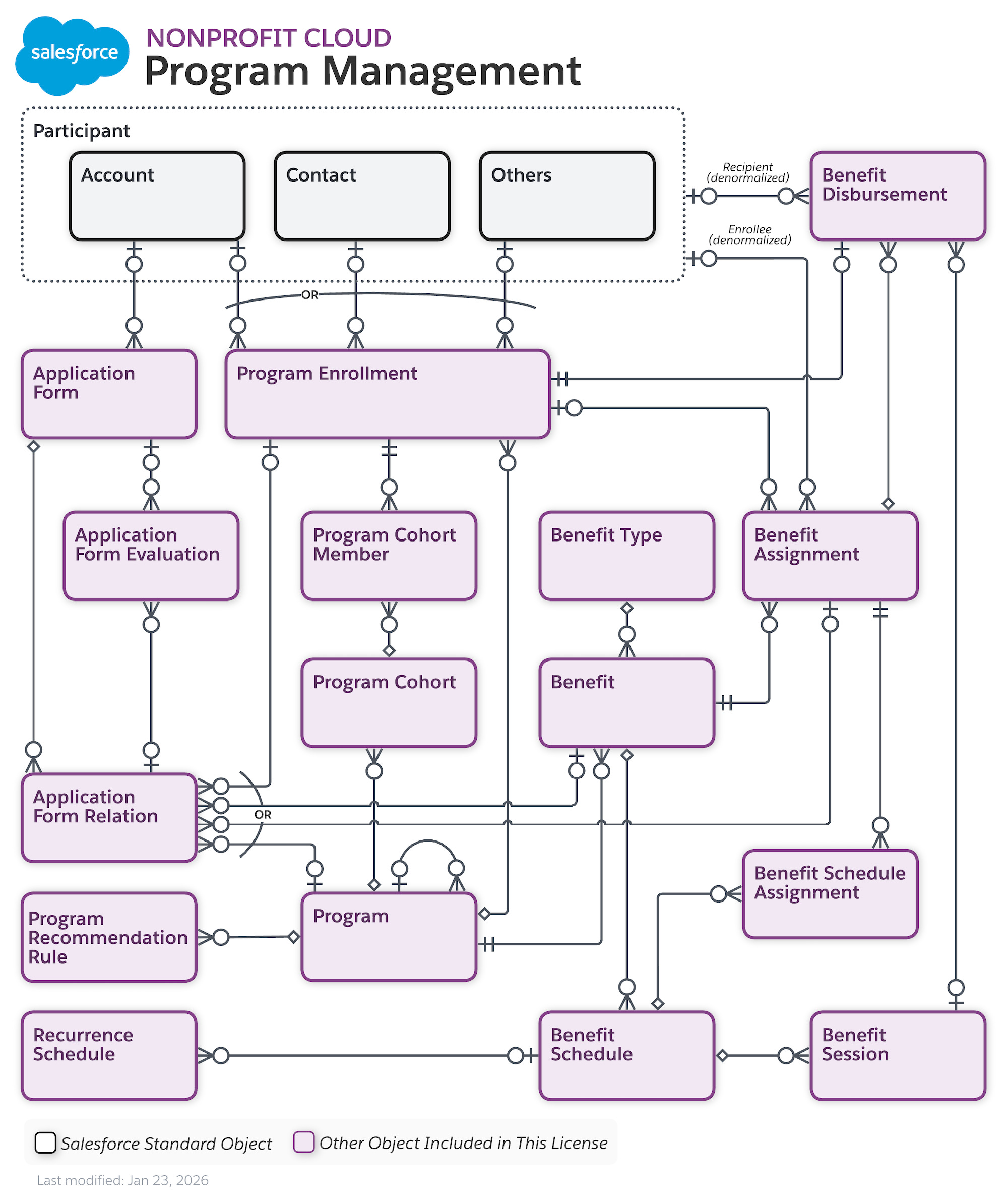
In the last episode, we learned about some of the data points for Program Management, in this episode, we dive deeper into these data points.
Remember that Salesforce is what I like to define as “An Advanced Excel”, Salesforce consists of Tables just like Excel, the term we use for Tables in Salesforce is Objects.
To clear the definitions out of the way:
Object = Table
Record = Row
Field = Column
Now, let’s go through all objects you would see or use in Program Management.
Program Management Objects
These are the objects I believe most if not all organizations would use
Account
Represents constituents; individuals or organizations.
Person Account
This is a Person or an Individual who would participate in a Program.Business Account
This is an Organization or Household that would participate in a Program.
Program
Your actual Programs such as Hunger Relief or Career ServicesProgram Enrollment
An Enrollment of a Person or an Organization in a particular Program. If one person signs up for multiple Programs, you would create multiple Program Enrollment records for them.Program Cohort
A Cohort is a way to group participants or enrollments together, for example, August Cohort or Summer Cohort.Program Cohort Member
This is where we list the participants of this Cohort.
Program Recommendation Rule
This is meant for internal planning, before our team can run this Program, these criteria must be met or these recommendations should be considered. Examples: Participants must be 18 years of age or this Program must be run within the state of Georgia only or this is a female-only Program.
This is the list of Rules that must be met before or throughout this Program.
Benefit
A benefit is what the participant is getting or receiving such as Food, or Books.Benefit Type
Classifications or Categorizations of Benefits. Examples:
A Book Benefit falls under the Benefit Type of Education
A Food Packet Benefit falls under the Benefit Type of HungerBenefit Assignment
Who signed up or showed interest for this Benefit?Benefit Schedule
How often does this Benefit get distributed? Example: A Class runs on a weekly schedule, every Monday and Wednesday.Benefit Schedule Assignment
A Benefit may have multiple schedules:
Schedule 1: Every Monday
Schedule 2: Every Tuesday
A Person receiving Benefits (Benefit Assignment) may receive this Benefit only once a week, so they can only participate in only one schedule. Benefit Schedule Assignment links this Person’s Benefit Assignment to a particular Benefit Schedule Assignment.Benefit Session
The actual Benefit Sessions.
The Benefit Schedule means Every Monday
The Benefit Sessions are exactly which Mondays; Monday Aug 17th Session and Monday August 24th Session.Benefit Disbursement
The sign up/registration to the Benefit Session. This consists of two pieces of information; who and what.
Example: John signed up for Monday Aug 17th Session
Application Form
An application received from a constituent to participate in a ProgramApplication Form Evaluation
Internal staff and reviewers leave their comments and decision on this application.Application Form Relation
You could relate this Application Form to any of the followingProgram Enrollment: If an Applicant is accepted, you would create a Program Enrollment for them, then you can link them together by creating an Application Form Relation, this way you know how this Program Enrollment came from the first place.
Benefit: This application was focusing on a particular Benefit or the applicant was interested in a particular Benefit or applying for a particular Benefit.
Benefit Assignment: I don’t know why I would specify the Benefit Assignment for the Application really xD
Program: Which Program this Application is for.
For those of you nerdy ones, here is the full Data Model by Salesforce: