What is a Data Model?
Don’t be deterred by “The Data Model”, you will find this to be very easy in a second, this is also known as “The Schema”, or the ERD “Entity Relationship Diagram”, fancy names for the tables and how the relate to each other.
Example, a Donor makes Donations.
We will need a table for the Donor, and another table for the Donations and relate these tables together so that we have the ability to filter donations by donor, or see each donor’s donation history.
To answer the question: What tables do we need? we ask:
What type of data do we have? or what type of data do we want to track?
Any answer here would mostly be a table, here are some examples
What are table relationships?
These tables live in a database, think of a database as an Excel file.
When entering multiple donations from the same person, instead of having to type the person’s name or email multiple times, we create a link between the Donations table and the Donors table which allows us to SELECT the Donor of each donation from the Donors table.
Once we link every Donation to their Donor, we can filter and view each Donor’s Donations.
Many To Many Relationships
There is one special type of relationship that helps us avoid duplicates and keep our database clean called “Many To Many Relationships”, it is really just the regular relationship but you create 2 of.
Example, a Person may attend multiple Events, or one Event can have multiple attendees. In this case we create a new table called “Event Attendance” where we create these rows. More on this topic here:
The Database Relationship Most Nonprofits Get Wrong

There is one unique relationship that we need to understand before we start building the Data Model, that is when you have multiple instances of table A related to multiple instances of table B, let’s take an example to clear this mumbling 🙂
Data Types
One last thing is that databases give us this nice capability where we get to specify a Data Type for a column or a field, a Data Type is a certain format this field must follow, otherwise, it won’t accept it.
Example: A column of Data Type Email will require you to enter a value in an email format.
Another example: A field of Data Type Number will not let you type text in it.
This helps enforce data quality.
Drawing our Data Model
I will be using Zoom Whiteboards to draw our Data Model, you can use Draw.io or lucid.app, or whatever tool to draw charts and diagrams.
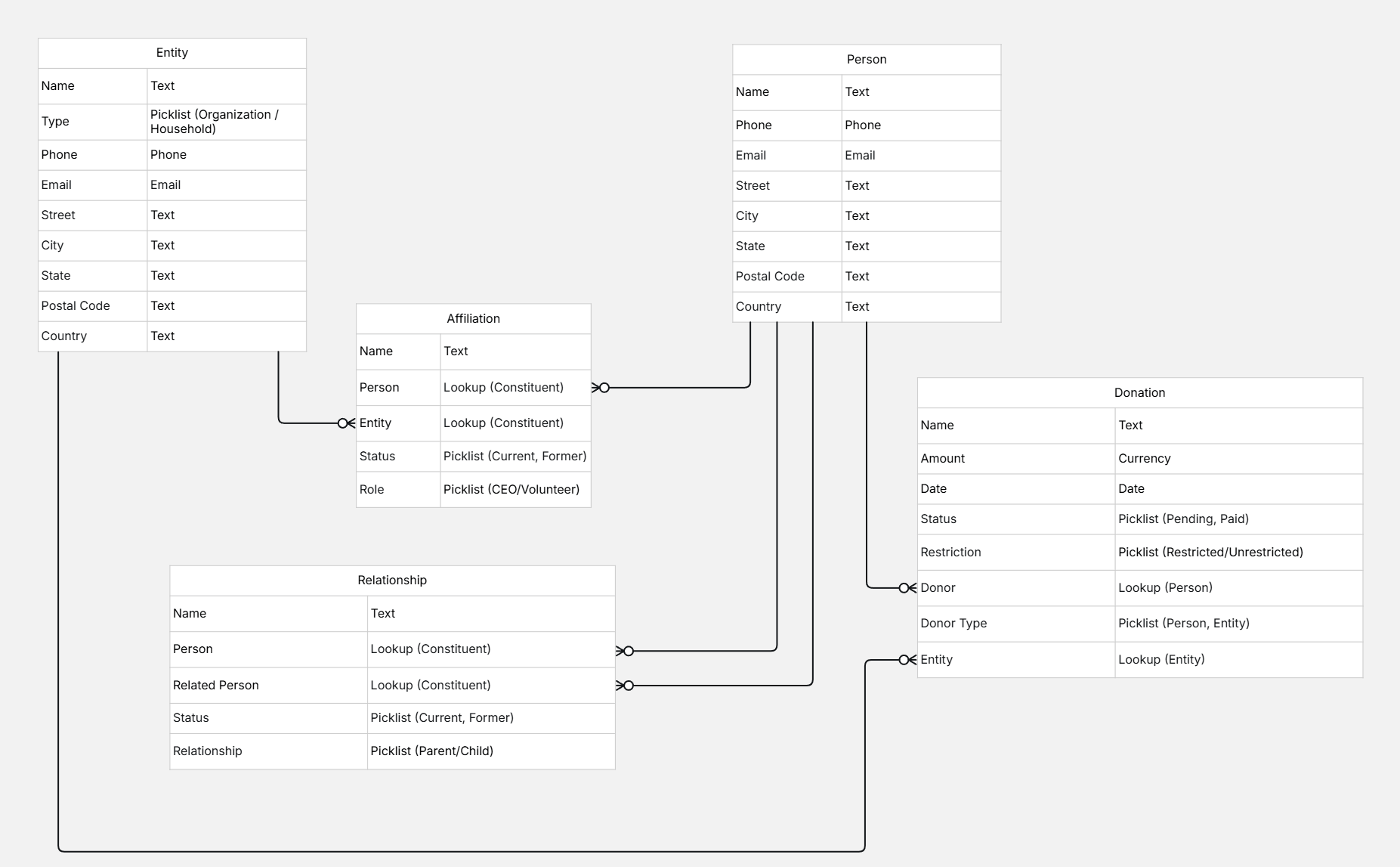
Here is the list of tables we need to build
Person Table
Entity Table
Affiliation Table
Relationship Table
Donation Table
Entity Relationship Diagram (ERD)